how do I change the color in a text block?

Home Forums I need help how do I change the color in a text block?

This topic contains 3 replies, has 2 voices, and was last updated by  tg_support 6 years, 7 months ago.

Viewing 4 posts - 1 through 4 (of 4 total)
  • Author
    Posts
  • #2054

    adminsuperwebycz
    Participant

    how do I change the color in a text block? Syntax not working

    <font size="3" color="red">This is some text!</font>

    Text still default color (white).

    thank you

    #2059

    tg_support
    Keymaster

    Hello!

    We have published a small update to make it easier.

    Please, export your theme again to apply the update.

    After that, follow these steps:

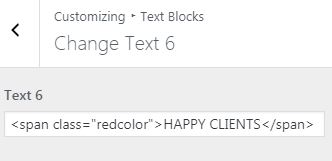
    STEP 1

    Use this syntax in your text block:

    text block with css

    STEP 2

    Add your own styles under Customizer -> Additional CSS

    Example: .redcolor{color:red;}

    WordPress custom CSS

    By doing the previous steps you should be able to change any text block style (color or any other CSS attribute)

    Tell me if you find any problem!

    #2084

    adminsuperwebycz
    Participant

    Thank you I’ll try. You do a great thing! Your support is the best!

    #2088

    tg_support
    Keymaster

    Thanks for the compliments! We try hard to help, your feedback means a lot 🙂

Viewing 4 posts - 1 through 4 (of 4 total)

You must be logged in to reply to this topic.