
Home › Forums › I need help › How enable UTF-8
This topic contains 12 replies, has 2 voices, and was last updated by 
-
AuthorPosts
-
September 8, 2019 at 6:41 pm #2178
adminsuperwebyczParticipantHi,
please help. I have two questions.
1,How enable UTF-8 (czech) in text mode and links.
2,How enable edit mode in links?thank you
September 10, 2019 at 2:23 pm #2193
tg_supportKeymasterThe encoding should show utf8 “weird” chars OK by default, check this screenshot:
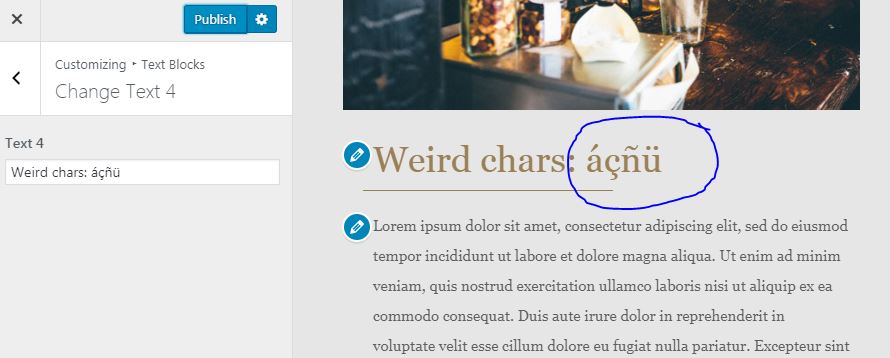
Did you edit the theme source files with any text editor? Some text editors may change your encoding when you save the file.
If that is not the case, please, send us your .txt exported file to hello(at)themesgenerator.com so we can check it.
About editing links directly in WordPress, it is still in our to-do list, since WordPress customizer does not allow us to edit links and we would need to code a workaround.
Thank you!
September 10, 2019 at 6:35 pm #2198
adminsuperwebyczParticipantI wrote the text in Czech directly on your website in the editor.
Bad encode is after export to wordpress.
I send *.txt files to your mail.
thank you
September 10, 2019 at 7:18 pm #2199
adminsuperwebyczParticipantI’ve done some tests and see if the problem is just with links. The text box is ok
September 11, 2019 at 4:09 pm #2208
tg_supportKeymasterThanks for the tests!
We have replied your email with a solution that has been working in our side.
Please, kindly reply the email when you can test it.
Kind regards.September 11, 2019 at 6:42 pm #2225
adminsuperwebyczParticipantYour fix works, please implement it into an online editor.
thank you
September 12, 2019 at 12:26 pm #2232
tg_supportKeymasterDoes it still happens if you create a new theme or edit any theme from the library?
We sent you that file because we were not able to replicate the problem.
When we write Czech characters in any new link, it still shows fine after exporting into WordPress. So the solution was to delete your links and create new ones.
We were only able to see the problem in the links that you created. If we do the same: create a new link from scratch (even in the .TXT you sent) the problem disappears in WordPress.
Waiting your reply, thanks!
September 20, 2019 at 1:43 pm #2315
adminsuperwebyczParticipantUnfortunately the only option is to edit it manually in a txt file. Upload to your server and re-export.
September 20, 2019 at 4:02 pm #2317
tg_supportKeymasterThanks for replying.
Could you maybe video capture your screen and show us the problem starting from a new design? (you can send it by email if you do not want to post it here)
You can use a free software to screen capture like: https://screencast-o-matic.com/screen-recorder
We are unable to replicate the problem, we try everything but we only see the problem in the links if we use the same .txt file that you sent us by email.
Seeing what you are doing exactly could help. Maybe your browser, language settings or keyboard config is what causes the character encoding problem.
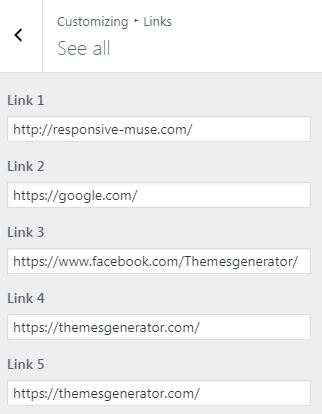
About your second question (editing links in WP) we are working on a new improvement that should be available during the next week (screenshot below).
Thanks for your patience and feedback!
 September 28, 2019 at 1:12 pm #2372
adminsuperwebyczParticipantI make video with UTF-8 error
-
AuthorPosts


You must be logged in to reply to this topic.